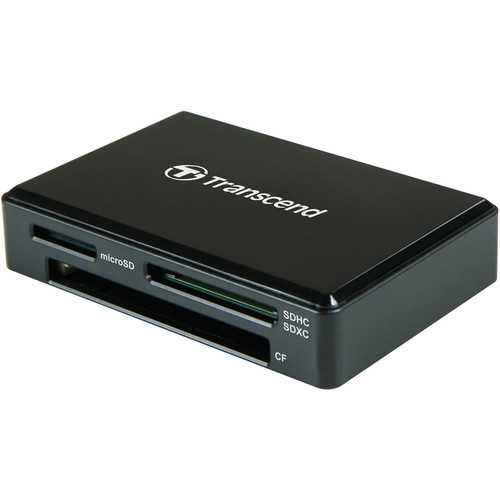
Transcend RDC8 Overview Transfer files from SD/SDHC/SDXC, microSD/SDHC/SDXC, and CompactFlash memory cards to your Windows, Mac, or Linux system using the black RDC8 USB 3.1 Gen 1 Card Reader from Transcend. This card reader supports the 5 Gb/s USB 3.1 Gen 1 standard, which is also known as USB 3.0. It also supports the UHS-I bus for SD and microSD cards, as well as the UDMA 7 standard for CompactFlash media. A built-in LED indicator displays data transfer activity and this card reader connects to your host system using its micro-USB interface and an included micro-USB to USB Type-C cable. In case of accidental file deletions or card errors, Transcend’s RecoveRx software is available as a free download. Please be aware that only one card slot can be used at a time. The simultaneous insertion of multiple cards is not supported. General Features USB Type-C Connector Transcend’s RDC8 card reader comes with a reversible USB Type-C connector for greater ease of use, since you don’t need to worry about plugging it in upside down. Transcend’s RDC8 card reader is compatible with laptops with a USB Type-C port, such as the Apple’s MacBook Pro, MacBook Air, and MacBook, plus the Google Chromebook Pixel 2. Fast Transfer Speeds Taking full advantage of the USB 3.1 Gen 1 standard, Transcend’s RDC8 card reader operates at speeds up to 5 Gb/s. In addition, the RDC8 has an LED indicator to show card insertion and data transfer activity. Multi-Functional Card Reader Transcend’s RDC8 card reader is equipped with three slots for SD memory cards, microSD memory cards, and CompactFlash cards, offering you a convenient way to transfer different types of digital files with one compact card reader. Free RecoveRx software Transcend’s RDC8 card reader comes with a free download of RecoveRx software, a user-friendly application that allows you to conduct an in-depth search within your storage device for traces of erased data that can be recovered. Supported devices include memory cards, USB flash drives, digital music players, external hard drives, and solid-state drives.
Manage Consent
To provide the best experiences, we use technologies like cookies to store and/or access device information. Consenting to these technologies will allow us to process data such as browsing behavior or unique IDs on this site. Not consenting or withdrawing consent, may adversely affect certain features and functions.
Functional
Always active
The technical storage or access is strictly necessary for the legitimate purpose of enabling the use of a specific service explicitly requested by the subscriber or user, or for the sole purpose of carrying out the transmission of a communication over an electronic communications network.
Preferences
The technical storage or access is necessary for the legitimate purpose of storing preferences that are not requested by the subscriber or user.
Statistics
The technical storage or access that is used exclusively for statistical purposes.The technical storage or access that is used exclusively for anonymous statistical purposes. Without a subpoena, voluntary compliance on the part of your Internet Service Provider, or additional records from a third party, information stored or retrieved for this purpose alone cannot usually be used to identify you.
Marketing
The technical storage or access is required to create user profiles to send advertising, or to track the user on a website or across several websites for similar marketing purposes.